AI Jewelry Photos from a Single Phone Picture
Photograph a ring, a pair of earrings or a necklace once on your phone. Get clean white background packshots, on-model shots and lifestyle scenes for your shop in seconds.
Try it free, no signup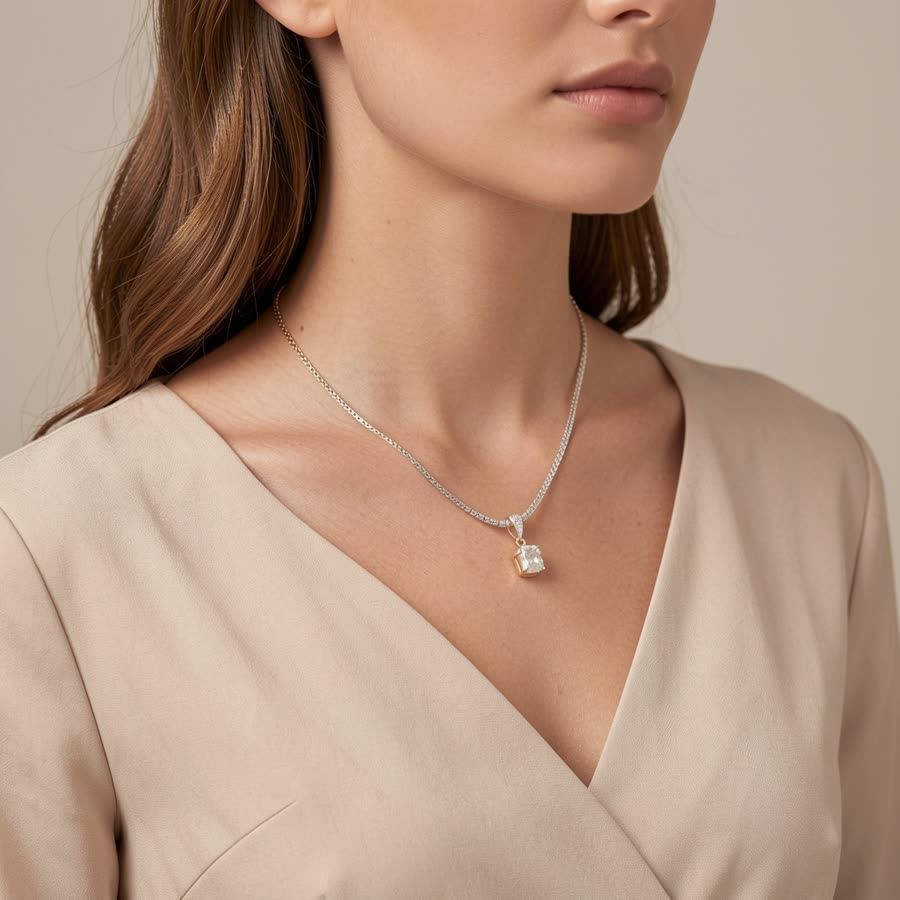
Why jewelry is so hard to photograph
A ring is smaller than your thumbnail, and it's made of materials that act like tiny mirrors. Polished gold reflects your ceiling light, your phone and your face. A cut stone throws light in every direction, so one angle sparkles and the next looks flat and grey. Get close enough to show the detail and your phone struggles to focus. Step back and the piece turns into a blur of shine.
Professional jewelry photographers solve this with light tents, macro lenses, focus stacking and hours of retouching. That usually costs more per piece than a small maker earns from selling it. Showing jewelry being worn is even harder: you need a model, a stylist, good skin retouching and the rights to use the photos. For a seller with 40 handmade pairs of earrings, a proper shoot is simply out of reach.
So most small shops end up with the same listing photo: a piece lying on a bedsheet or a kitchen counter, with a yellow cast and a reflection of the window in the metal. Buyers can't judge the size, the shine or how it looks on a person, so they scroll past.
How it works in 3 steps
- Upload one photo. Shoot the piece on your phone near a window, on any plain surface. It doesn't need to be perfect, just sharp and well lit.
- Choose a style. Pick the shots you want: a white background packshot, on-model shots, or lifestyle scenes like marble, velvet or a jewelry dish. Add a short description such as "sterling silver hoop earrings" so the result matches your piece.
- Download. Your photos are ready in seconds, in square or portrait format for Etsy, Shopify, Amazon and Instagram. Regenerate any shot you don't love.
What you get
White background packshots
Clean, evenly lit photos on pure white, with soft natural shadows. Use them as the main image on Etsy, Amazon and Google Shopping, where a plain background makes the piece stand out in search results.
On-model shots
See your jewelry being worn without booking a model: earrings on an ear, a necklace on the neck and collarbone, a ring on a hand, a bracelet on a wrist. These shots answer the question every buyer has, "how big is it, really?", and they are often the photo that sells.
Lifestyle scenes
Styled shots for social media and your store banners: a ring on a marble tray, a necklace draped over linen, earrings beside a coffee cup in morning light, or a gift box ready for a birthday. They make a simple piece feel like a present.
Who it's for
- Etsy jewelry sellers who need 5 to 10 photos per listing and want every listing to look like it came from the same studio.
- Shopify store owners building a brand look across the homepage, collection pages and product pages.
- Instagram sellers who post new pieces every week and need fresh images for posts, stories and ads.
- Handmade makers working at a kitchen table, who would rather spend their time making jewelry than learning lighting.
If you sell other products too, the same upload works for clothing, bags, shoes and home goods, so your whole catalogue can share one consistent style.
Before and after
Each pair shows the phone photo a seller uploaded and the photo ShotKart made from it.


AI redraws the scene around your piece, so very fine details such as stone settings, tiny engravings or chain links can shift slightly. Always compare the result with your real piece before listing it. When the jewelry must stay exactly as photographed, use Background Swap, which keeps your piece unchanged and only replaces the background.
Selling more than jewelry? See our guides to Etsy product photos and Shopify product photos.
Try it on your own product
Upload one phone photo and get HD product photos in seconds. Try it without an account, then sign up free for 3 HD photos every day.
Try it freeQuestions
Can AI put my earrings on a model?
Yes. Choose an on-model shot and ShotKart places your earrings on an AI model's ear, with matching light and skin tones. The same works for necklaces on the neck, rings on a hand and bracelets on a wrist. The models are generated, so you don't need model releases.
Will it keep my jewelry's real details?
The shape, colour and metal finish of your piece are kept, and most simple designs come out very close to the original. Very fine details like stone settings, engravings or thin chains can shift slightly, so check every photo before you list it. For an exact match, use Background Swap.
Can I use the photos on Etsy and Amazon?
Yes. You own the photos you make and can use them on Etsy, Amazon, Shopify, Instagram and anywhere else you sell. Etsy and Amazon expect photos to show the item accurately, so only use images that match your real piece.
Is it free?
You can try it free without an account. Sign up free to get HD photos without a watermark every day. After that you can buy credit packs when you need more, with no subscription.
What photo should I upload?
A sharp, close-up phone photo of one piece, taken in soft daylight near a window, on a plain light surface. Avoid direct sun, flash and busy backgrounds. If you photograph a pair of earrings, place them side by side so both are clearly visible.